
Clauses & Checks
How COREY's rule-based model checking works, in plain language.
Checking a model means asking practical questions: "is the required data filled in?", "is this value allowed?", "does this code match the expected regular expression?", or "is this number within range?". COREY stores those checks as clauses and runs them across the whole IFC model.
For CORENET X workflows, clauses can represent IFC-SG data requirements from an Excel mapping or from your team's own review standard. COREY then shows which elements pass, need attention, or fail, so the team can fix issues before submission.
The building blocks
Rule
One specific check — e.g. 'a wall's fire rating must be filled in'.
Clause
A named group of related rules — e.g. 'Wall data requirements'.
Check result
What COREY shows per element: OK, Warning, or Error.
A clause is just a titled folder of rules. Grouping rules into clauses keeps your checks organised and makes results easier to read ("3 elements failed the Fire safety clause").
Anatomy of a rule
Every rule answers four questions:
| Part | Question it answers | Example |
|---|---|---|
| IFC Type | Which kind of element does this apply to? | IFCWALL (walls) |
| Subtype | (optional) Which predefined type does this narrow to? | SOLIDWALL, or blank for every wall |
| Target | Which piece of information should we look at? | The property Pset_WallCommon › Reference |
| Check | What must that information satisfy? | Must be one of WALL-A, WALL-B, WALL-C |
| Severity | How serious is a failure? | Error or Warning |
Subtype: narrowing to a predefined type
Leave Subtype blank and the rule applies to every element of that IFC type — this is how all
rules behave by default. Fill it in and the rule applies only to elements whose predefined type
matches, so IFCSLAB + FLOOR checks floor slabs and stays silent on roof slabs.
A subtype that does not match makes the rule inapplicable, not failed. That is the difference
between using Subtype and writing a check against the PredefinedType attribute: the latter would
report every roof slab as an error.
COREY reads the subtype from the element's PredefinedType, falling back to its type object when
the exporter put the value there, and to ObjectType when PredefinedType is USERDEFINED.
Target: where to look
A target is either:
- an Attribute — a built-in field on the element, identified by name (such as
NameorGlobalId); or - a Property — a value inside a property set, identified by the property set
it lives in and its label (such as
Pset_WallCommon›Reference).
Check: what to require
COREY offers five kinds of check:
| Check | Passes when… | Use it for… |
|---|---|---|
| Required value | the field is filled in (not blank/missing) | making sure information isn't left empty |
| Allowed values (enum) | the value is one of a list you provide | codes, classifications, fixed vocabularies |
| Number range | the number is within a minimum and/or maximum | dimensions, ratings, counts |
| Regex | the value matches a regular expression | IDs, codes, or naming standards |
| Boolean | the value means true or false as expected | flags such as load-bearing or external |
Any check automatically fails if the value is missing or empty — so "Allowed values", "Number range", "Regex", and "Boolean" also guarantee the field is present.
Severity: how loud to be
Each rule fails as either:
- Error — a real problem that should be fixed.
- Warning — worth a look, but not necessarily wrong.
When an element breaks several rules, its overall result is the most serious one (Error beats Warning beats OK).
A worked example
Clause: "Wall basics"
- Rule 1 — On every
IFCWALL, the attributeNameis required. Failing this is an Error.- Rule 2 — On every
IFCWALL, the propertyPset_WallCommon › Referencemust be one ofWALL-A,WALL-B,WALL-C. Failing this is a Warning.
Run this against a model and COREY checks every wall. A wall with no name shows an
Error; a wall named correctly but with a Reference of WALL-Z shows a
Warning; a wall that satisfies both is OK.
Demo wall template
The bundled Demo IfcWall template is a small
clause set used for demos and smoke checks. In the Revit sample model it checks
element identity and wall fire-rating metadata.
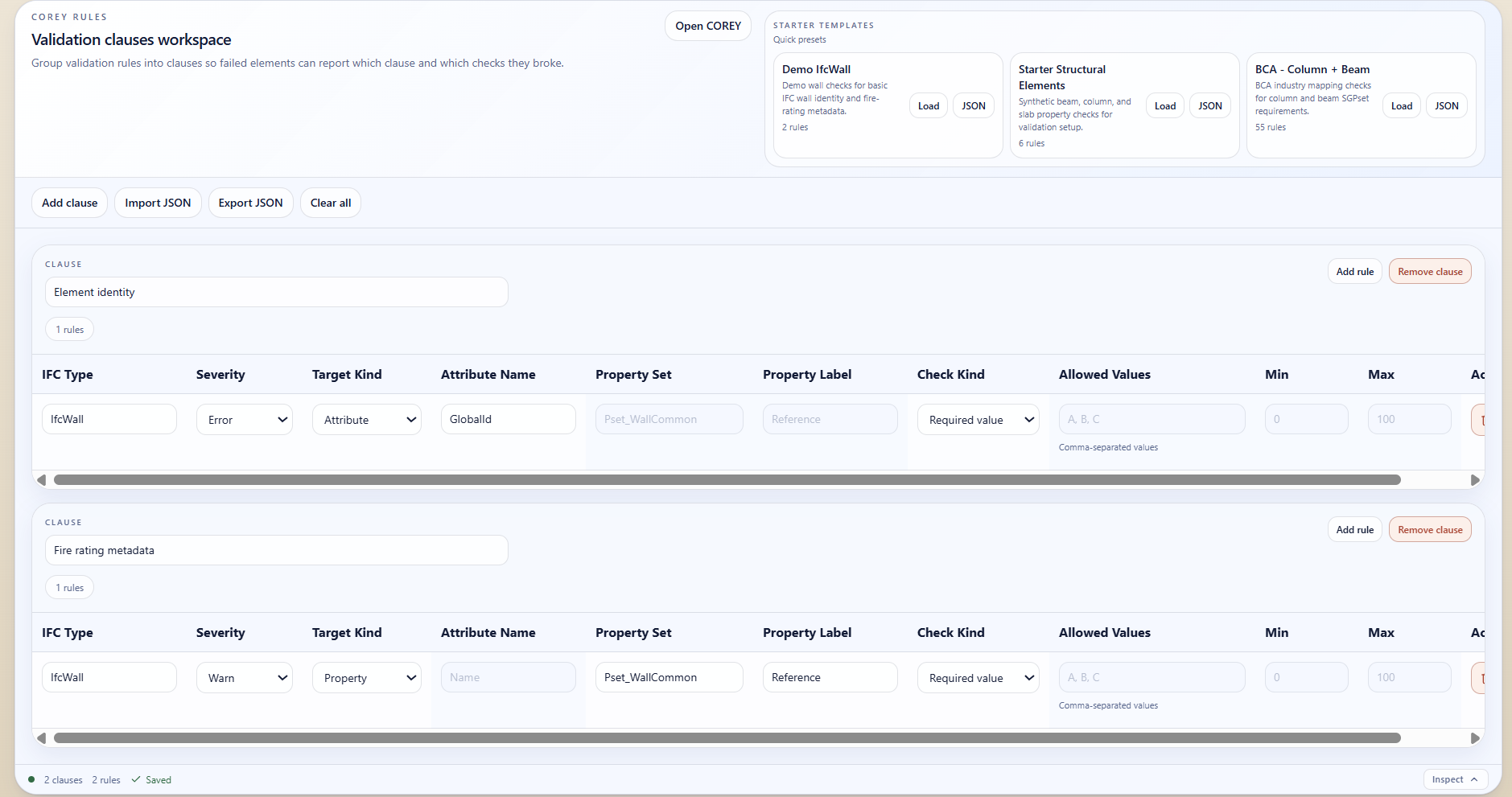
The demo wall template loaded from the clause workspace quick presets.
Reading the results
After you run validation, COREY:
- Highlights elements in the 3D viewport — one colour for warnings, another for errors — so problems are easy to spot.
- Lets the data table filter by failed clause, so you can review the affected elements in bulk.
- Keeps the selected element synced with the 3D viewport and properties panel.
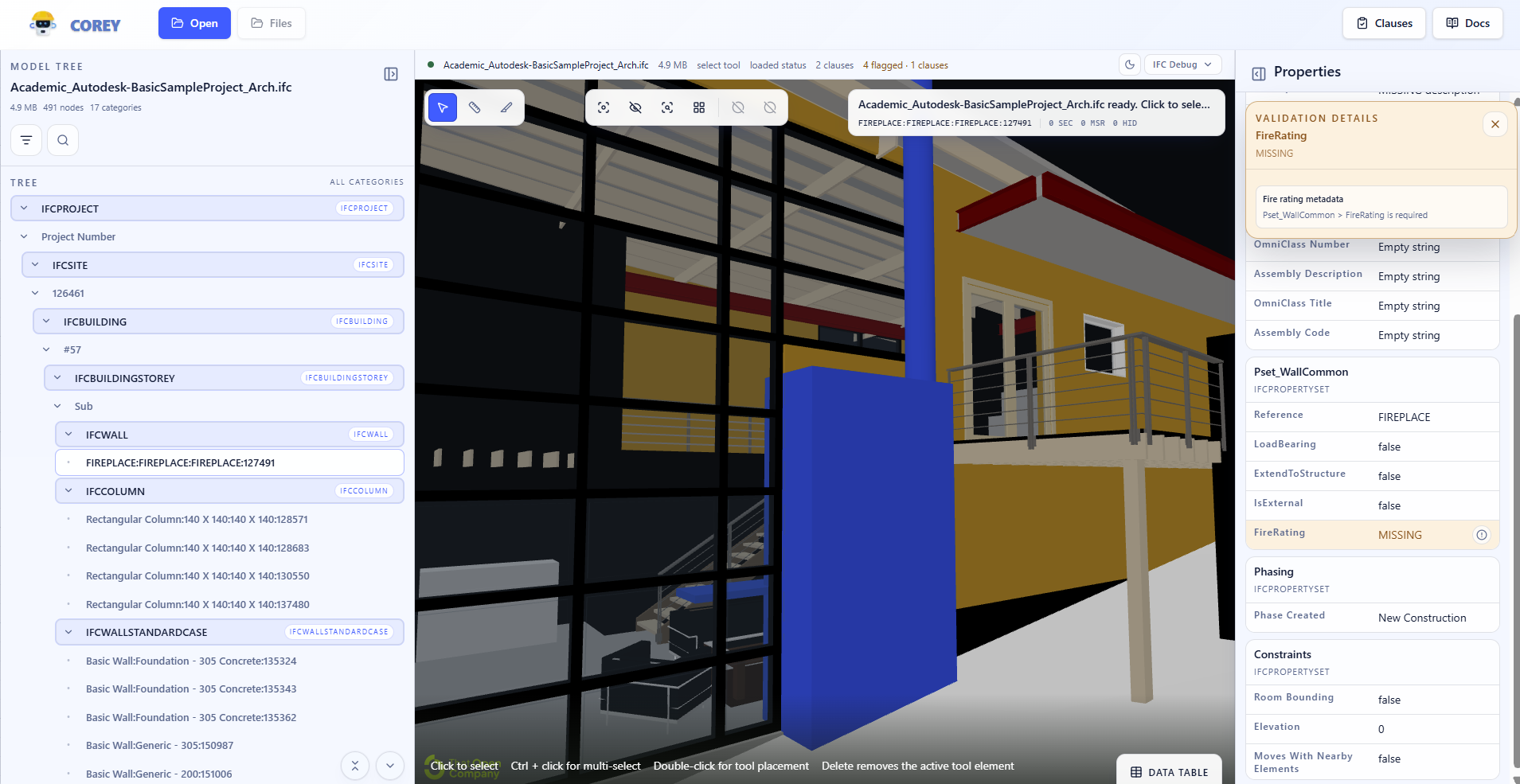
A validation run against the demo model highlights six flagged wall elements.
Saving and reusing clauses
You can export your clauses and import them later or on another project. This lets a team agree on one standard set of checks and apply it consistently.
With the optional backend, clause sets are also saved as shared templates. Use Save as template in the toolbar to keep the whole set under a name, or the Template button on a clause header to keep just that clause. Both appear under Your templates in the Templates menu, where everyone on the deployment can reach them.
Loading a whole-set template replaces your clauses; inserting a clause template appends it, so you can build a set up from saved pieces and insert the same one more than once. Any template can be deleted from that menu, the built-in starters included.
As the library grows, search by name or description and filter by where a template came from. Each row carries a coloured band showing how its rules split across severities, so you can tell a set that mostly warns from one that mostly blocks before you load it.
CX Industry Mapping starter templates
The agency templates cover BCA, SCDF, URA, NEA, PUB, LTA, and NParks, with shared requirements included in each. Find them under Starter in the Templates menu. A separate Shared Requirements template contains just the shared clauses.
Review these starters before use: component requirements can overlap or conflict, and some accepted-value lists are incomplete.
For developers
Clauses are stored as a small JSON document (a version plus a clauses array,
each clause holding rules). The repository includes a starter file,
public/resources/starter-essential-elements.json, and the format is validated
on import. The exact schema and evaluation logic live in src/features/rules.
See Clause data model for the documented contract.